Lesson 3. Authorization: Keys, Tokens, OAuth#
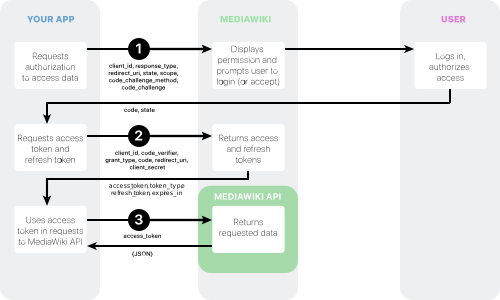
Goal: understand how an agent proves it has permission to use an API.
Why Authorization Is Needed#
APIs shouldn't be open to everyone. Otherwise anyone could:
- read your data
- change your data
- use your account (e.g., send SMS on your dime)
Authorization is how you prove that you (or your agent) are allowed to use the API.
Types of Authorization#
1. API Key
The simplest method. You get a secret key (a string of characters) and pass it with every request.
Example:
GET https://api.example.com/clients
Authorization: Bearer sk_test_1234567890abcdef
Where to get it: in the service settings (usually "API Keys", "Settings", or "Developers").
Security: keep the key secret, don't publish it in code, don't share it with others.
2. Bearer Token
Similar to an API Key, but the token may expire (e.g., after 1 hour). After expiry, you need a new token.
Example:
GET https://api.example.com/clients
Authorization: Bearer eyJhbGciOiJIUzI1NiIsInR5cCI6IkpXVCJ9...
Where to get it: usually via a separate request (login + password → token).
3. OAuth 2.0 (for access to user accounts)
Used when the agent must act on behalf of the user (e.g., send email via Gmail as the user).
How it works:
- The user clicks "Allow access" on the service page (e.g., Google)
- The service issues an access token
- The agent uses the token for requests on behalf of the user
Example: Zapier asks for access to your Google Sheets → you allow → Zapier gets a token → Zapier can read/write your spreadsheets.
Security: the user always controls what permissions they grant the agent (read-only / full access).
How to Get an API Key#
Example: Telegram Bot API
- Message @BotFather in Telegram
- Send the command
/newbot - Enter the bot name
- Enter the bot username (must end with
bot) - BotFather gives you a token (API Key):
1234567890:ABCdefGHIjklMNOpqrsTUVwxyz - Use this token to send requests to the Telegram Bot API
Example request:
GET https://api.telegram.org/bot1234567890:ABCdefGHIjklMNOpqrsTUVwxyz/getMe
Response:
{
  "ok": true,
  "result": {
    "id": 1234567890,
    "is_bot": true,
    "first_name": "My Bot",
    "username": "my_bot"
  }
}
Where to Store Keys#
Never store keys in code or public places!
Store keys in:
- environment variables — if you run the agent on a server
- secret storage of the service (e.g., n8n has a "Credentials" section where you can save keys)
- password manager (1Password, Bitwarden) — if you work locally
Never publish keys on GitHub, don't send them in chats, don't show them in screenshots.